

How to Order Pages in the Sidebar Menu

Organizing Your Site in Cascade
In Cascade, the order of links in the sidebar menu is controlled by the order of assets in the overall folder structure of the site.
How to Reorder Assets in a Folder
- Open a folder you wish to sort in the preview window
- View the folder’s contents by order by clicking the Order table header
- Adjust the order of assets by dragging and dropping the table rows in the order you desire
How Sidebar Menus Work in Aggie UX
In Aggie UX, the sidebar menu is automatically populated based on the information architecture of your site. The goal of the sidebar menu is to help users navigate to pages across the website hierarchy that share a similar idea.
When using a sidebar menu on a page, you will see a link back to the parent page above a list of all sibling pages to the page you are viewing.
Understanding Terminology
Much like in a nuclear family, we discuss relationships between pages by using the ideas of “parents,” “children,” and “siblings”. All pages except for a home page have a parent. Not all pages have children, and not all pages have siblings.
- Parent Page: A parent page can’t exist without children pages. In relation to the page you are on, the parent page is up one level in the site hierarchy.
- Children: Children pages are subpages to a parent page. In relation to the page you are on, the child page is down one level in the hierarchy.
- Siblings: Sibling pages can only exist if a parent page has more than one child page; “sibling” refers to the relationship between those two (or more) child pages. In relation to the page you are on, a sibling page is on the same level of hierarchy and shares the same parent page.
What does this mean in practice?
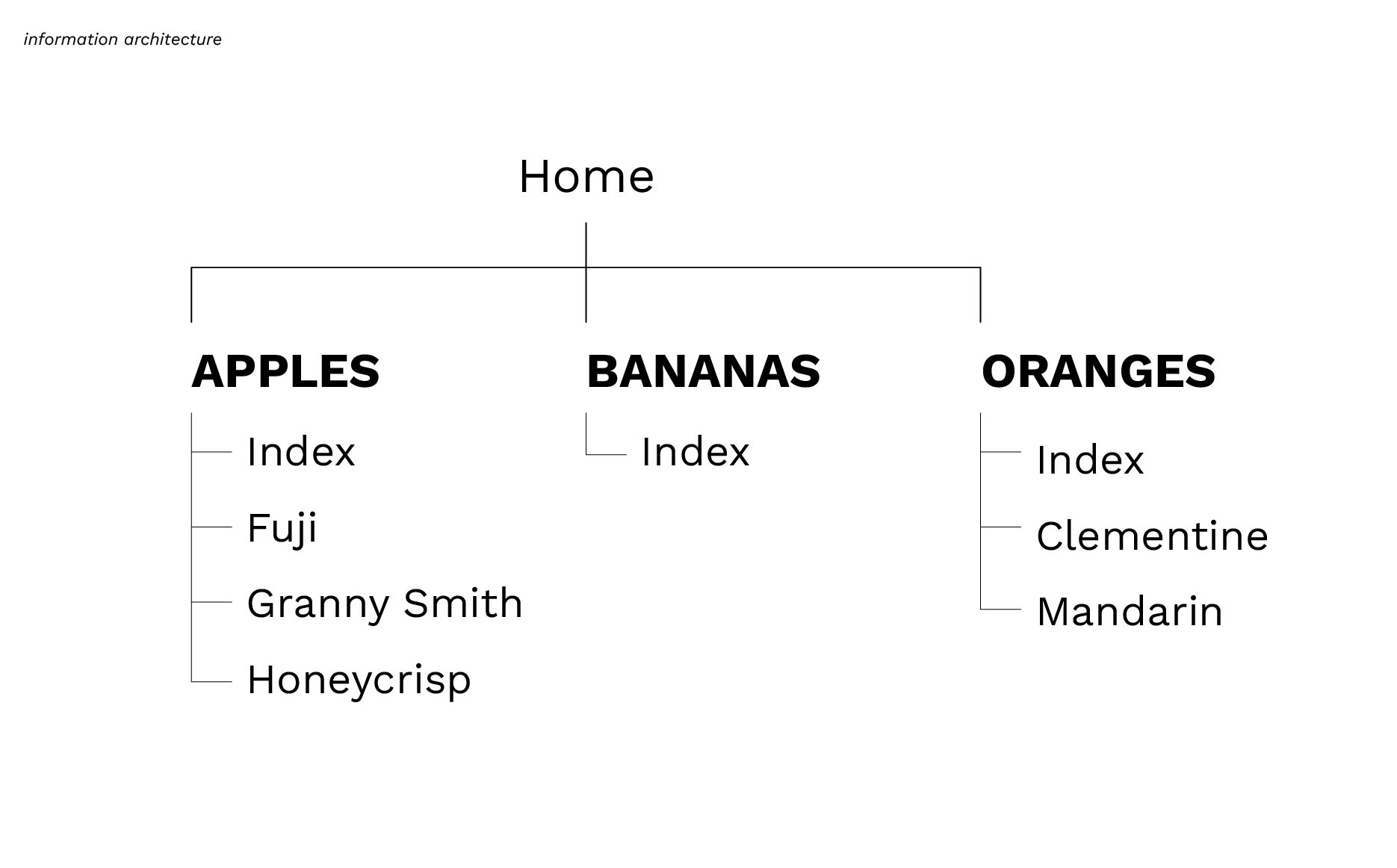
On our website in the example above, the site hierarchy (or information architecture) shows the relationships between different types of fruit. The top-level pages for this website are Apples, Bananas and Oranges; they are all child pages of the home page. Apples, Bananas, and Oranges are all siblings because they share the commonality of being a type of fruit. Some of these fruit types have subcategories, or children pages. In our example, Apples and Oranges both have children pages, while Bananas don’t. In the same way Apples, Bananas, and Oranges share the commonality of being a fruit, the pages Fuji, Granny Smith, and Honeycrisp all share the commonality of being Apples. These pages are children pages to the parent page Apples and siblings to each other.