

Aggie UX Documentation
Learn where to access robust documentation about using the Aggie UX design system.

As with all aspects of Aggie UX, we strive to provide the best user experience possible. We have put as much care into the design and development of the user experience of working with the design system as we have into the designed components themselves.
Storybook Documentation Site — aggieux.tamu.edu
We have developed a robust documentation website at aggieux.tamu.edu. This documentation website is built using an open source tool called Storybook that allows us to provide easy access to our coded components, visual examples and documentation.
Storybook consists of two main page types:
- Docs — indicated by an orange document icon, these pages of content contain detailed documentation for both content contributors and developers.
- Stories — indicated by a blue bookmark icon, these pages contain a preview of a component with interactive controls set up to allow you to configure a component how you want it to look using preset options. Changing the controls will update the component preview and the HTML output.
We will link to relevant documentation and story examples throughout the Aggie UX training courses for more information.
Always consider storybook (aggieux.tamu.edu) the source of truth about the availability, functionality and customizations for a given component.
Component Statuses
Near the top of most docs, you will see a component status block which will tell you whether or not a given component is released in Figma, Storybook, Cascade or WordPress (example below).

Always refer to aggieux.tamu.edu to get the most up-to-date component statuses.
How to Read a Component Status
- Stable Release: This component is ready and available for public use starting on a specific release (Figma, Storybook and WordPress).
- Stable: This component is ready and available for public use, but is not tied to a specific release (Cascade only).
- Beta Release: This component has been released to a small number of users to help test the component’s implementation, but is not ready for public use.
- In Progress: This component is under development and is not yet ready for public use.
- On Roadmap: We have plans to make this component in this platform, but are not actively working on development.
About Releases
Aggie UX is a living, breathing product built to improve over time. In web development, this is called Continuous Integration and Continuous Delivery (CI/CD). Basically what this means is our team is continuously working on creating new features and components and then deploying them through our suite of products: Figma, Storybook, Cascade and WordPress.
Figma, Storybook and WordPress are all version controlled according to semantic versioning specifications. This just means that for transparency and historical record keeping, we use a numbering system that distinguishes between patches, minor releases and major releases to record when changes are made to that specific product.
| Release Type | Numbering | Description |
|---|---|---|
| Major | 1.1.3 | Foundational code or setup has completely changed and/or elements have been removed/deprecated. NOT fully backwards compatible with what has already been released. |
| Minor | 1.1.3 | New features added; backwards compatible with what has already been released. |
| Patch | 1.1.3 | Simple bug fixes (correcting errors from a previous release); backwards compatible with what has already been released. |
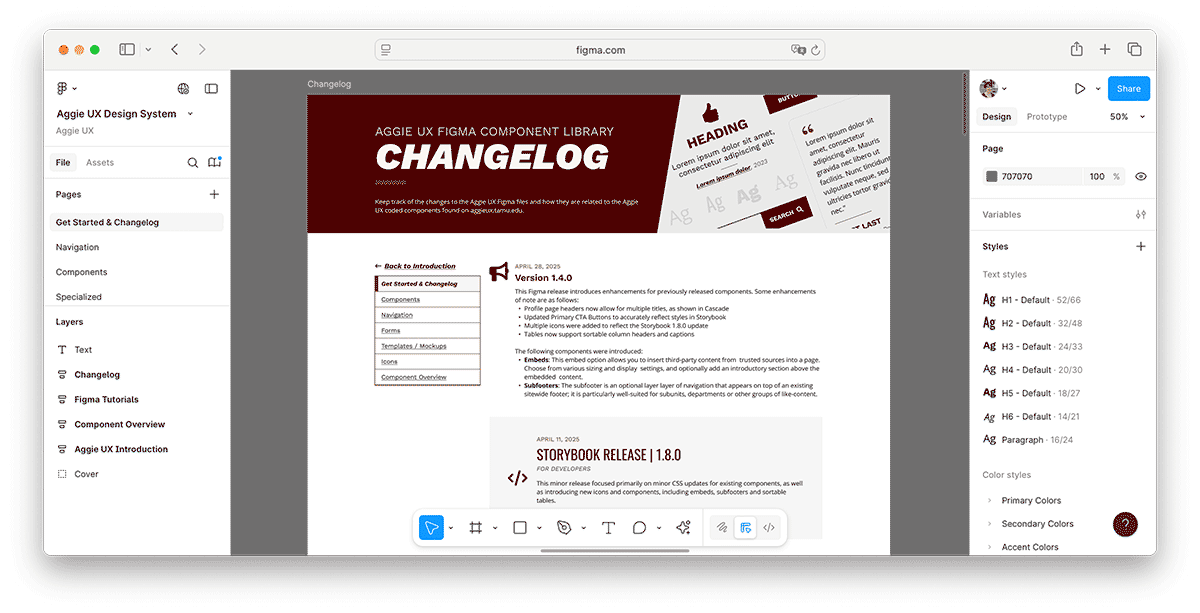
We try to keep Figma and Storybook (aggieux.tamu.edu) in sync with each other as far as what components and variations are available. This does not mean that Figma v1.1.3 has the same functionality as Storybook v1.1.3. Instead, look for releases that came out around the same time. For example, Figma v1.4.0 was released on April 28, 2025, to align with components released in Storybook v1.8.0 on April 11, 2025. While they’re numbering systems are not in sync, we try to keep the current versions of each as in-sync as possible.
To see the differences between one release and another, check out that product’s changelog.
About Changelogs
A changelog is the official record of changes made on a product between versions.
Storybook’s changelog is available on aggieux.tamu.edu.
Each Figma release includes a changelog on the Get Started & Changelog page.
Keep Learning
Learn about Other Aggie UX Resources in Aggie UX 101 Module 1 Chapter 6.