

Step 4: Write Content and Mock Up Pages
Learn about a collaborative process to create and edit web content while designing each page.
In this step, we are focused on writing content and designing page layouts.
In step 3, we outlined all of the pages that need to be created along with high-level requirements for each specific page. Using these content strategy materials will help you write targeted content in ways that make sense for your audience.
Collaborative Content Process
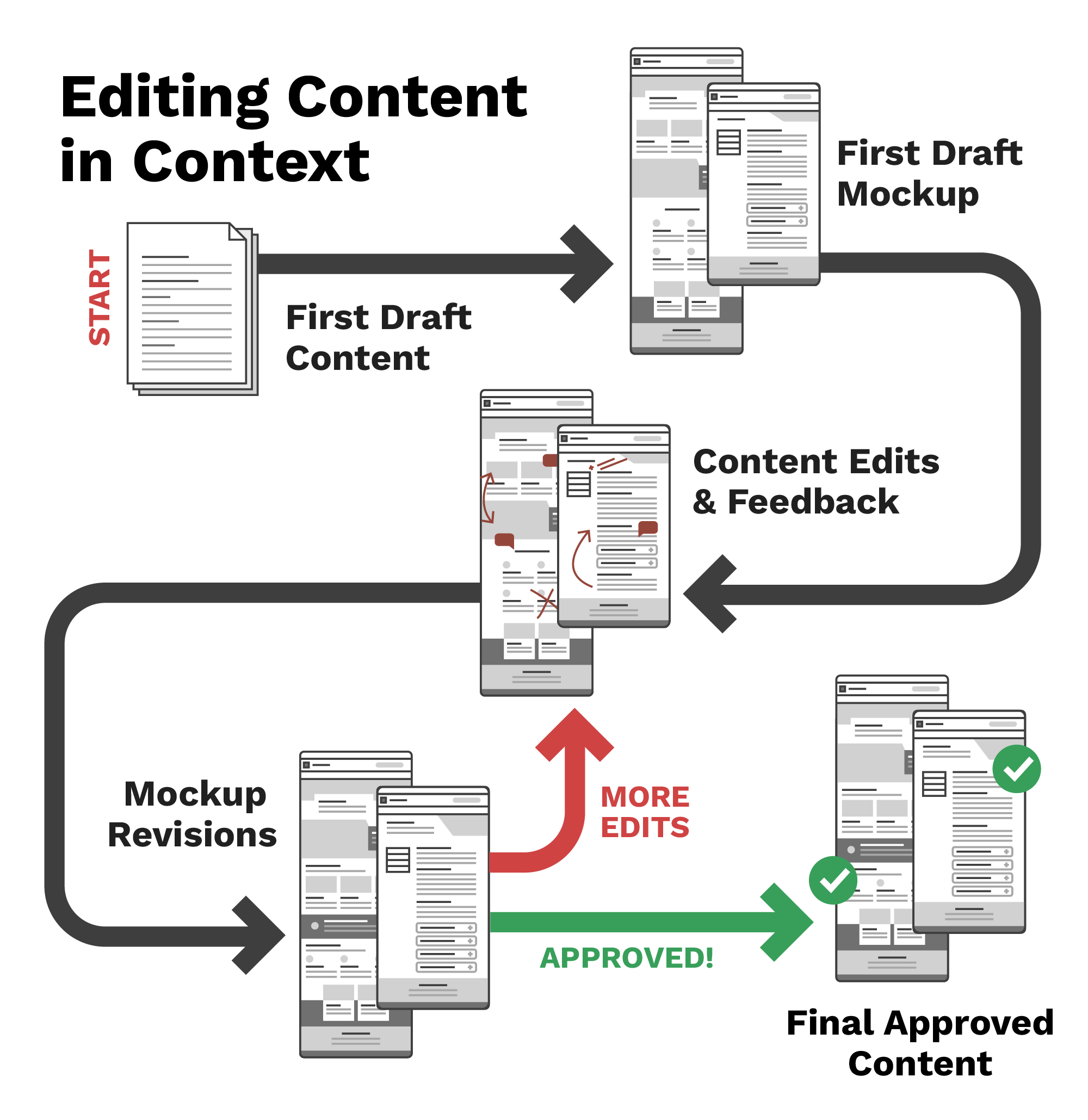
We have found that web content is often better when content editors can see their content in context. This is why we recommend a collaborative process where content is put into designed mockups that show how the content will look when put into a page layout.
Editing Content in Context
Editing content in context typically goes like this:
- Written content first draft: A writer* writes a first draft of content for a page based on that page’s specific content strategy. You can use writing tools like Microsoft Word, Google Docs, or tools designed specifically for collecting web content like Content Workflow by Bynder (previously GatherContent).
- First draft mockups: A designer** then takes that content and creates a first-draft mockup of that content within a page. If making a site using Aggie UX, you can use our Figma community files to create page mockups. (Learn more about using the Aggie UX Figma library in the Aggie UX + Figma Help Center). Through this process, the designer may identify content gaps within content, such as needing additional headings or descriptions to use certain components. Working with Figma and FigJam are easy ways to show Aggie UX mockups and get feedback from others using comments.
- Content edits and feedback: The designer then shares the first round of mockups back with the writer to show what they’re proposed content would look like in context. Together they can brainstorm on what additional content needs to be made or what existing content needs to be adjusted. Through this process, the writer should come up with edits to their content for the designer to implement in the next iteration of the mockup.
- Mockup revisions: Using the revised content, the designer will make changes to the mockup to share back with the writer. Steps three and four may repeat a few times. Once both of these people are happy with the content and layout, they should share it with their leadership to get final approval as appropriate for their unit.
- Final approved content: The final mockups are a record of how the specific page is going to look and what content to include. This record will significantly speed up the website build and approval process.
*’Writer’ in this context is anyone who is in charge of creating web content.
**’Designer’ in this context is anyone who is in charge of laying out web content. The designer may be the same person as the writer.
Why not get all content approved before being mocked up?
- Sometimes content writers aren’t used to writing for web and need the visual to understand how it will layout
- Working within a design system means there are some content requirements for different components
- Designer may have good suggestions for changing content based on component layouts that will ultimately improve usability
- Collaborative effort often leads to better results
Case Study: Texas A&M University at Galveston
The Texas A&M Galveston team built a new site using Aggie UX for their new college — the College of Marine Sciences & Maritime Studies. The initial site launched in August 2024, and the Galveston team began the process of moving department content into the new college’s website in fall 2024.
For the first part of their project, they were focused on creating the college site only, using some existing content and creating a lot of new content as well.
Their Process for Moving Department Content
- Create page mockups in Figma
- Using existing content as “first draft”
- Using empathy to strategically make layout decisions and find content holes
- Use FigJam for page review with screenshots of mockups
- Use stickers to make the process straightforward AND fun!
- Use comments to record content edits
- Make changes in mockups
- Repeat steps 2 & 3 until team approves layout + content